
Federating Clusters for Zero-Downtime Kubernetes


Every multi-region setup eventually meets the same awkward moment: a whole cluster goes away, and the identical copy of your service running two regions over might as well not exist, because nothing is wired to treat them as one thing. Failover becomes a runbook: restore, repoint DNS, and wait for an outage that, on paper, you’d already paid to survive.
Linkerd’s multicluster extension closes that gap by letting several clusters present a service as a single, load-balanced endpoint. The part that the official tasks gloss over is that a real platform almost never picks one multicluster mode. Some services want federation (same service everywhere, one endpoint, automatic failover). While others want mirroring (reach a specific remote service by name). And you frequently want both patterns living on the same set of links. The docs walk through each mode on its own. This post wires all three together across three GKE clusters, with a full-mesh link topology, a chaos test that takes out an entire cluster, and scripts you can clone and run on a fresh GCP project.
Companion repo: Every script referenced here lives in this repository. Feel free to clone it, set your project ID, and run it.
Linkerd multicluster modes: Gateway, flat, and federated
Linkerd’s multicluster extension supports three modes. The nice thing is they’re not mutually exclusive: on the same set of linked clusters, the mode is chosen per service via a label.
| Mode | Label | What happens | Network Requirement |
|---|---|---|---|
| Hierarchical (gateway) | mirror.linkerd.io/exported=true | Service mirrored as <svc>-<cluster>, traffic routed through a gateway | Gateway IP reachable |
| Flat (pod-to-pod) | mirror.linkerd.io/exported=remote-discovery | Service mirrored as <svc>-<cluster>, traffic goes directly to remote pods | Flat network (pod IPs routable) |
| Federated | mirror.linkerd.io/federated=member | All same-name services unioned into <svc>-federated, load balanced across all clusters | Flat network (pod IPs routable) |
The distinction that matters operationally is that hierarchical mirroring works on any network. Only the gateway IP needs to be reachable, while flat and federated modes need real pod-to-pod connectivity. On GCP, VPC-native GKE clusters on peered VPCs give you that flat network for free. So, you can run federated services for your core workloads over a flat network and still mirror a specialized service through a gateway from a cluster that isn’t on that network. Most platform teams I’ve seen end up with exactly this kind of mix.
Multi-region architecture: GKE cluster setup
We have three GKE clusters across three regions, fully linked to each other (six directional links total). Three demo services, each using a different multicluster mode:
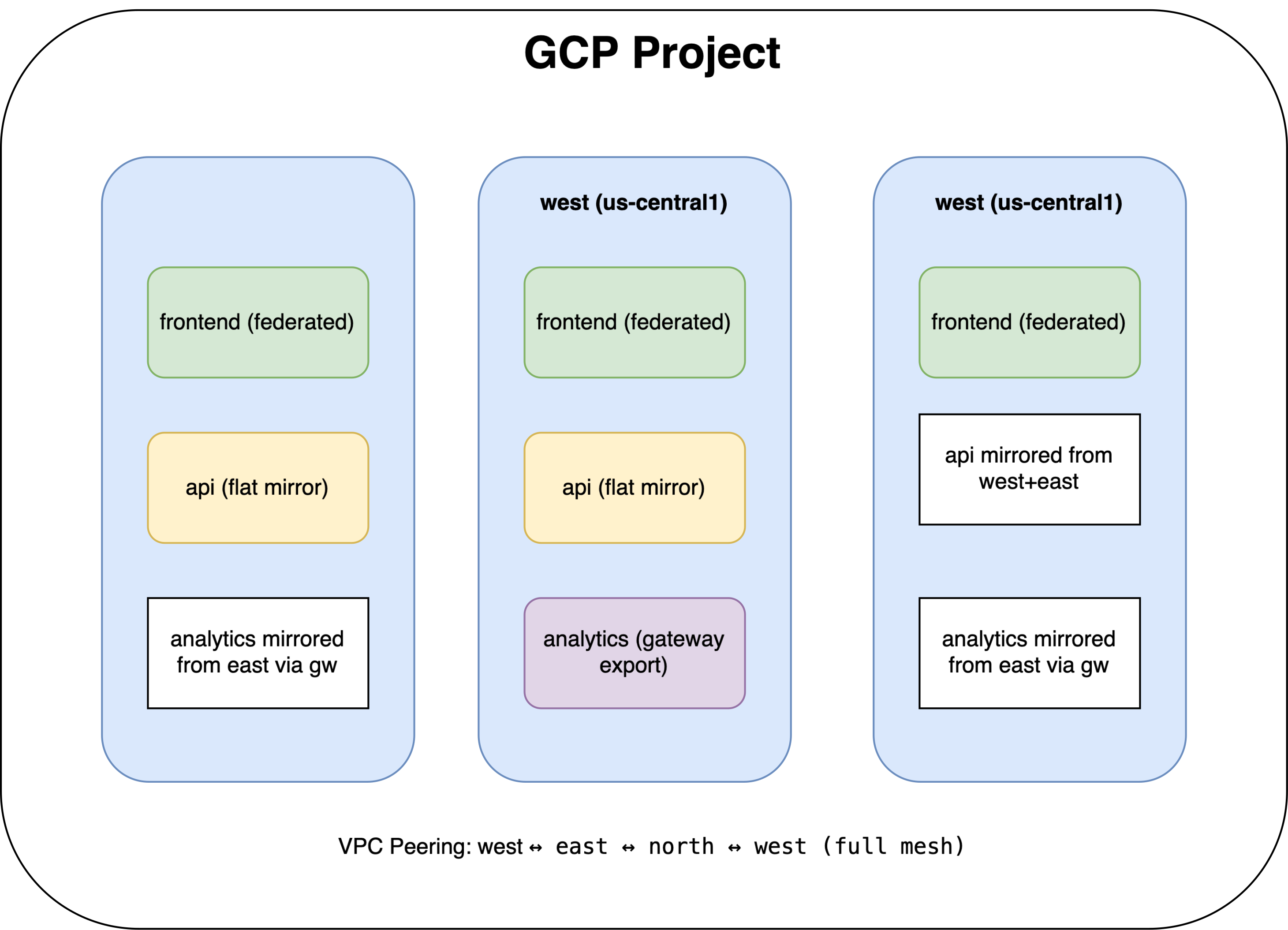
frontend is federated and runs in all three clusters. A single federated frontend service in each cluster load-balances across all nine pods (3 replicas × 3 clusters). When a cluster goes down, the remaining six pods absorb the traffic with no application changes.
api is flat-mirrored and runs in west and east. The north cluster
consumes it as api-west and api-east, which are explicit remote service
names with traffic sent straight to the remote pods. This is what you reach for
when the client needs to decide which backend it talks to, for example, to keep
a request in-region for data locality.
analytics is gateway-mirrored and runs only in east. Exported through the
Linkerd gateway so west and north reach it as analytics-east-gw without
needing flat-network connectivity to east’s pods. It’s here mainly to prove
that gateway mode coexists with flat and federated modes on the same links.
Deployment prerequisites: GKE, Linkerd, and CLI tools
- A GCP account (free-tier credits cover this. Use three standard clusters with small node pools)
gcloudCLI, authenticated (gcloud auth login)kubectlv1.28+stepCLI,brew install step(for certificate generation)helmv3- ~30 minutes for the full setup
The infra script enables the compute and container APIs for you, so a
brand-new project works out of the box.
Step 0: Configure
Clone the repo, create a local .env file from the example file, and customize
it for your GCP project. The defaults are enough for the rest of the demo, so in
most cases you only need to change the project ID.
git clone <your-repo-url>
cd blog-linkerd-federation
cp env.example .env
Open .env and set at least your project ID. The file ships with sensible
defaults for everything else:
export GCP_PROJECT="your-project-id"

export REGION_WEST="us-central1"
export REGION_EAST="us-east1"
export REGION_NORTH="europe-west1"

# One zone per region. We pin node-locations to a single zone so num-nodes is
# the TOTAL node count — see the cost note below for why this matters.
export ZONE_WEST="us-central1-a"
export ZONE_EAST="us-east1-b"
export ZONE_NORTH="europe-west1-b"

export CLUSTER_MACHINE_TYPE="e2-medium"
export CLUSTER_NODE_COUNT="1"
export FRONTEND_REPLICAS="3"
At minimum, set GCP_PROJECT. Everything else ships with sensible defaults:
three regions, one zone per region, and small node pools to keep the cost down.
If you run cat .env, you should see the full set of variables populated.
Load the variables into your current shell so the scripts can read them:
source .env
Every script below reads from this file, and they all run with
set -euo pipefail, so a missing variable fails loudly rather than silently.
That’s why env.example carries the full set, the VPC and cluster names
included, instead of just the project ID.
Step 1: Provision three GKE clusters with VPC peering
Run the infrastructure script to create the networks and clusters. This takes about 10–15 minutes, so it’s a good point to grab a coffee.
./scripts/01-infra.sh
This script does the following:
- Enables the
computeandcontainerAPIs (no-op if they’re already on). - Creates three VPCs with non-overlapping pod and service CIDRs, a hard requirement for VPC peering.
- Sets up full-mesh VPC peering (west↔east, east↔north, north↔west) with
--export-custom-routesand--import-custom-routesso pod CIDRs are actually advertised. This is what gives us the flat network. - Creates three GKE Standard clusters, one per VPC/region, each pinned to a single zone.
- Renames the kubectl contexts to
west,east,north.
Here’s the address plan the script uses. The ranges are intentionally non-overlapping so VPC peering can route pod traffic correctly:
| Cluster | VPC Subnet | Pod CIDR | Service CIDR |
|---|---|---|---|
| west | 10.10.0.0/20 | 10.100.0.0/14 | 10.104.0.0/20 |
| east | 10.20.0.0/20 | 10.108.0.0/14 | 10.112.0.0/20 |
| north | 10.30.0.0/20 | 10.116.0.0/14 | 10.120.0.0/20 |
Non-overlapping ranges are non-negotiable. If pod CIDRs overlap across peered VPCs, routing breaks silently. Pods get responses from the wrong cluster, or connections time out with nothing useful in the logs. Ask me how I know.
One zone, not three. A GKE regional cluster places --num-nodes nodes in
each of three zones by default. With --num-nodes 1 that’s 3 nodes per
cluster, 9 total, and triple the bill. The script pins --node-locations to a
single zone so CLUSTER_NODE_COUNT=1 really means one node per cluster.
Cost note: Three Standard clusters with one e2-medium node each run
roughly $10–15/day total for this demo (management fee + nodes + a small gateway
load balancer on east). The teardown script removes everything.
Step 2: Install Linkerd with a shared trust anchor
Install Linkerd into all three clusters using a shared trust anchor. The script generates the certificates, installs the control plane, and configures each cluster to trust the others for cross-cluster mTLS.
./scripts/02-linkerd-install.sh
This generates a root CA and per-cluster issuer certificates, then installs Linkerd on all three clusters:
root.crt (shared trust anchor)
├── issuer-west.crt + issuer-west.key
├── issuer-east.crt + issuer-east.key
└── issuer-north.crt + issuer-north.key
Per-cluster issuer certs are a production habit worth keeping: if one cluster’s issuer is compromised you rotate it in isolation, without touching the others. The shared root is what lets cross-cluster mTLS work at all. Every proxy can verify every other proxy’s identity back to the same anchor.
To keep resource usage (and cost) down, this installs the control plane only with no Viz add-on.
Step 3: Install multicluster and create a full-mesh link topology
Set up the multicluster components and create a full-mesh topology between the clusters. After this step, every cluster can consume services from every other cluster.
./scripts/03-multicluster-setup.sh
This is the step with the most going on. We create six directional links,
every cluster linked to every other cluster, so every cluster gets a
<svc>-federated service for federated workloads, and every cluster can consume
mirrored services from any other.
The wrinkle is the gateway. Only east needs one (it’s the only cluster
exporting analytics hierarchically), so we enable the gateway in east’s
install and leave everyone else gatewayless. One install per cluster, all flags
at once, no re-running install a second time to bolt a gateway on afterward:
# west: gatewayless, with one controller per cluster it consumes from
linkerd --context west multicluster install --gateway=false \
  --set controllers[0].link.ref.name=east \
  --set controllers[1].link.ref.name=north \
  --set controllers[2].link.ref.name=east-gw \
  | kubectl --context west apply -f -

# east: gateway enabled here, controllers for the clusters it consumes
linkerd --context east multicluster install --gateway=true \
  --set controllers[0].link.ref.name=west \
  --set controllers[1].link.ref.name=north \
  | kubectl --context east apply -f -

# north: gatewayless, controllers for west, east, and east's gateway link
linkerd --context north multicluster install --gateway=false \
  --set controllers[0].link.ref.name=west \
  --set controllers[1].link.ref.name=east \
  --set controllers[2].link.ref.name=east-gw \
  | kubectl --context north apply -f -
Note the controller count. The service-mirror controller runs on the consuming
side, one per link. west and north each consume analytics via the gateway,
so they get a third controller for the east-gw link; east doesn’t consume
its own analytics, so it only needs two.
Then we generate the links. Flat/federated links use --gateway=false; the
gateway-aware link to east (for the analytics export) is a separate link
named east-gw:
# Flat links (no gateway) — for federated + flat-mirrored services
linkerd --context east multicluster link-gen --cluster-name=east --gateway=false \
  | kubectl --context west apply -f -
linkerd --context west multicluster link-gen --cluster-name=west --gateway=false \
  | kubectl --context east apply -f -
# ... (all six directions)

# Gateway-aware link from east (for the analytics hierarchical export)
linkerd --context east multicluster link-gen --cluster-name=east-gw \
  | kubectl --context west apply -f -
linkerd --context east multicluster link-gen --cluster-name=east-gw \
  | kubectl --context north apply -f -
After this, linkerd multicluster check on any cluster should report every
linked cluster healthy.
Step 4: Deploy the demo services
Deploy the demo workloads. The next sections label them for federation, flat mirroring, and gateway mirroring and show what each mode creates.
./scripts/04-deploy-app.sh
Three services, three modes, and deliberately the same buoyantio/bb image for
all of them, a tiny HTTP server that echoes a fixed string. The application
isn’t the point. The point is that one kubectl label changes how Linkerd
treats the service across clusters, with everything else held constant.
frontend (federated)
Deploy to all three clusters with a per-cluster response string, then labeled for federation:
for ctx in west east north; do
  kubectl --context $ctx -n mc-demo label svc/frontend mirror.linkerd.io/federated=member
done
Within a few seconds, frontend-federated shows up in all three clusters:
$ kubectl --context west -n mc-demo get svc
NAME                 TYPE        CLUSTER-IP     PORT(S)    AGE
frontend             ClusterIP   10.104.1.50    8080/TCP   45s
frontend-federated   ClusterIP   10.104.2.100   8080/TCP   10s
api (flat-mirrored)
Label the api service in west and east for flat export:
kubectl --context west -n mc-demo label svc/api mirror.linkerd.io/exported=remote-discovery
kubectl --context east -n mc-demo label svc/api mirror.linkerd.io/exported=remote-discovery
Now north can see api-west and api-east as separate services:
$ kubectl --context north -n mc-demo get svc
NAME                 TYPE        CLUSTER-IP      PORT(S)    AGE
frontend             ClusterIP   10.120.1.50     8080/TCP   45s
frontend-federated   ClusterIP   10.120.2.100    8080/TCP   10s
api-west             ClusterIP   10.120.3.20     8080/TCP   5s
api-east             ClusterIP   10.120.3.21     8080/TCP   5s
The client in north picks api-west or api-east explicitly. Traffic will go
straight to the remote pods with no gateway in the path.
analytics (gateway-mirrored)
Next, deploy only to east, labeled for hierarchical (gateway) export:
kubectl --context east -n mc-demo label svc/analytics mirror.linkerd.io/exported=true
This creates analytics-east-gw in west and north, routed through east’s
Linkerd gateway:
$ kubectl --context west -n mc-demo get svc analytics-east-gw
NAME               TYPE        CLUSTER-IP     PORT(S)    AGE
analytics-east-gw  ClusterIP   10.104.5.10    8080/TCP   5s
The endpoints for this service point at east’s gateway IP, not the analytics pods directly. That’s the right trade when you can’t guarantee flat-network connectivity, or when you specifically want the gateway handling load balancing and mTLS termination.
Step 5: Verify all three modes
Generate traffic against all three service patterns and verify that each resolves the way you expect.
./scripts/05-verify.sh
This deploys a traffic generator in north that hits all three service patterns
in a loop and tails the logs. The response strings come straight from the
deployments, so you’ll see which cluster served each request:
[federated]  frontend from east
[federated]  frontend from west
[federated]  frontend from north
[flat-west]  api from west
[flat-east]  api from east
[gateway]    analytics from east
You can also inspect endpoints to see how differently each mode resolves:
# Federated: endpoints span all three clusters
$ linkerd --context west diagnostics endpoints frontend-federated.mc-demo.svc.cluster.local:8080
NAMESPACE   IP            PORT   POD                        SERVICE
mc-demo     10.100.1.15   8080   frontend-xxx-west          frontend.mc-demo
mc-demo     10.108.0.42   8080   frontend-xxx-east          frontend.mc-demo
mc-demo     10.116.0.33   8080   frontend-xxx-north         frontend.mc-demo

# Flat mirror: endpoints are the remote pod IPs
$ linkerd --context north diagnostics endpoints api-west.mc-demo.svc.cluster.local:8080
NAMESPACE   IP            PORT   POD                        SERVICE
mc-demo     10.100.2.10   8080   api-xxx-west               api.mc-demo

# Gateway mirror: the endpoint is east's gateway IP on port 4143
$ kubectl --context west -n mc-demo get endpoints analytics-east-gw
NAME               ENDPOINTS             AGE
analytics-east-gw  35.186.xxx.xxx:4143   30s
Three modes, one mesh, one set of clusters, and the only difference between them is a label.
Step 6: The chaos test, kill a cluster
This is where federation earns its keep. We simulate a full cluster failure and watch how each service type reacts.
./scripts/06-chaos-test.sh
The script scales every deployment in east to zero replicas (standing in for a
cluster outage), then samples traffic from north across all three patterns.
Federated service (frontend-federated)
Before:  west=33% east=33% north=33%
After:   west=50% north=50%              ← automatic rebalance, zero errors
Traffic redistributes immediately. No errors, no config changes. As east’s pods drop out of the endpoint list, Linkerd’s load balancer simply spreads requests across what’s left.
Flat-mirrored service (api-east)
Before:  api-east responds normally
After:   api-east returns 503s           ← expected: the remote pods are gone
This is the correct behavior. The client explicitly asked for api-east, and
east is down. Handling that is the client’s job: fail over to api-west, retry,
or front the two with a TrafficSplit. Mirroring hands you control; federation
hands you automation.
Gateway-mirrored service (analytics-east-gw)
Before:  analytics-east-gw responds normally
After:   analytics-east-gw returns 502s  ← the gateway is down too
Same story here, the client asked for a specific remote, and that remote is gone.
Bring east back:
kubectl --context east -n mc-demo scale deploy --all --replicas=1
kubectl --context east -n mc-demo scale deploy/frontend --replicas=3
(The script restores frontend to its full FRONTEND_REPLICAS count rather
than leaving it at 1, otherwise east would rejoin the federation under-weighted,
landing around 14% instead of an even third.) Within 15–30 seconds all three
patterns recover: the federated service rebalances back to 33/33/33, and the
mirrored services start answering again.
The lesson worth carrying out of this: federation is the right default for anything that should simply be available everywhere. Mirroring, flat or gateway, is the right call when the client genuinely needs to know which cluster it’s talking to.
Step 7: Teardown
When you’re finished with the demo, run the teardown script to remove all the infrastructure and avoid ongoing GCP charges.
./scripts/99-teardown.sh
This removes all three clusters, the VPC peerings, subnets, firewall rules, and VPCs created by the earlier steps. Run it when you’re done so the meter stops.
Selecting your Linkerd multicluster architecture strategy
After running all three side by side, here’s the decision framework I’d hand a teammate:
| Question | → Mode |
|---|---|
| Should the client be cluster-agnostic? | Federated |
| Does the client need to pick a specific cluster? | Flat mirror |
| Is there no flat network between clusters? | Gateway mirror |
| Do you need automatic failover with no app changes? | Federated |
| Do you need traffic splitting with explicit weights? | Flat mirror + TrafficSplit |
| Is the service a singleton (only in one cluster)? | Mirror (flat or gateway) |
And you can mix them freely in the same mesh. The label on each service decides its behavior independently of the others.
Linkerd multicluster gotchas and configuration lessons
The gotchas that cost us time and don’t jump out of the docs:
VPC peering route exchange. Creating the peering isn’t enough. You have to
pass --export-custom-routes and --import-custom-routes on both sides, or
the pod CIDRs never get advertised. The symptom is brutal to diagnose: DNS
resolves fine, then connections just hang. Maddening to debug.
Regional clusters multiply your nodes. A regional cluster with
--num-nodes 1 quietly gives you three nodes (one per zone). We pin
--node-locations to a single zone to keep it at one. Easy to miss until the
bill arrives.
Overlapping CIDRs. GKE auto-allocates large ranges out of the 10.0.0.0/8
space by default, and three clusters built with defaults will overlap, at which
point peering fails silently. Always set explicit, non-overlapping
--cluster-ipv4-cidr and --services-ipv4-cidr.
Controller count matters. Each cluster needs one service-mirror controller
per link it consumes. Miss one and the Link CR is created, but nothing mirrors,
and linkerd multicluster check still looks green, so you’ll stare at it for a
while before the penny drops.
Federated service naming is fixed. The federated service is always
<svc>-federated; you can’t change the suffix. Clients have to target
frontend-federated, not frontend. Plan your naming around it, or use a
TrafficSplit to point frontend at frontend-federated.
Gateway and flat can’t share one link. A single Link CR is either gateway or
flat, not both. To get both behaviors to the same cluster you create two links
with different names. That’s why our setup uses east (flat) and east-gw
(gateway) as separate links, with a matching controller for each on the
consuming clusters.
Production checklist
- Bidirectional links between all clusters (full mesh) so every cluster has the federated service
- cert-manager with a shared CA instead of hand-rolled
stepcertificates - Separate issuer certs per cluster (don’t skip it!)
- NetworkPolicies restricting cross-cluster traffic to only the services that need it
- Linkerd authorization policies for fine-grained access control
- Monitoring: pipe Linkerd-Viz metrics into your Prometheus/Grafana stack, and alert on a federated service’s endpoint count dropping
- GitOps: keep Link CRs and multicluster config in version control
- Test failover regularly: scale a cluster to zero in staging and confirm traffic redistributes
Key takeaways: Mastering multi-region Linkerd deployments
The docs show each multicluster mode in isolation; real platforms need all three at once. Federation covers the common case: The same service everywhere, automatic failover, and nothing to change in the app. Flat mirrors give you explicit, cluster-aware routing when data locality matters. Gateway mirrors get you cross-cluster reach when a flat network isn’t on the table.
What surprised me most about building this is how little of it is genuinely
complex. It’s mostly wiring. Once the trust anchor is shared and the links are
up, adding a service to the federation is a single kubectl label, and removing
a cluster is as simple as letting it go down. The mesh adjusts on its own.
For teams running across regions, that’s a real chunk of operational toil gone: your services run everywhere, traffic finds the healthy copies, and you pick the multicluster mode per service based on what that service actually needs.
References
- Linkerd Federated Services Task Guide: official walkthrough for federation
- Linkerd Multicluster Reference: architecture and mode details
- Linkerd Multicluster Communication Guide: hierarchical mirroring walkthrough
- Installing Multicluster Components: installation reference
- Linkerd 2.17 Announcement: federated services introduction
- GKE VPC-native Clusters: flat networking on GCP